Getting Started in My KPOP Shop
Open your store, claim rewards, redeem codes, and run the core loop before your first hire.
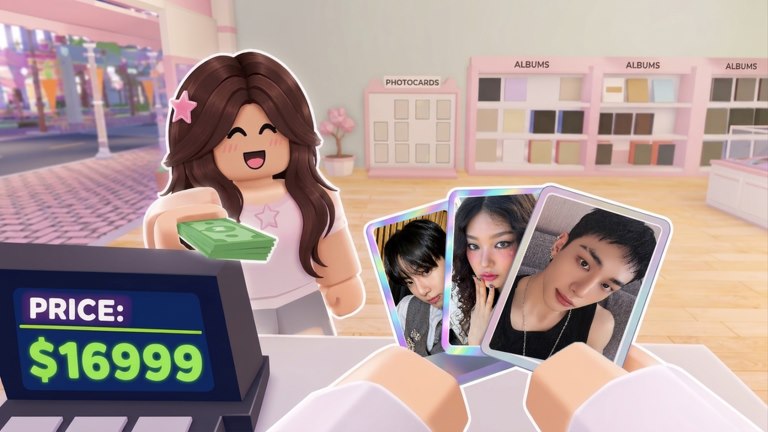
My KPOP Shop is a Roblox simulation shop tycoon by the Chuuves group. Your job is to stock shelves, serve fans at the register, stop thieves, hire staff when you can, open photocard packs, and grow a themed store that sells packs, albums, and lightsticks. This guide is the first-hour checklist: join the place, claim daily rewards, redeem codes in Settings, stock and sell, open early packs, then hire your first helper so you are not glued to one task forever.
Join the game and orient yourself
Open the Roblox place for My KPOP Shop and wait for your shop to load. You will see the store floor, shelves that need product, a register for fans, and space that later becomes decoration and expansion. Controls follow normal Roblox movement; the important menus are Settings (for codes), shop management for stocking and hiring, and any daily reward prompt that appears on join. Claim daily rewards as soon as they are available—they are free progress and often cash you need for the first restock cycle.
Walk the floor once before you sell. Note empty shelves, the path fans take to the register, and corners where thieves can linger. That mental map makes the first rush calmer. If a friend is joining you later, skim Co-op & Friends after this guide so you already know how to split register versus restock.
Redeem codes before the first rush
Codes live in the Settings menu—not a random billboard. Open Settings, find the code box, and redeem active strings carefully (caps matter). As of the current wiki pass, working examples include KPOPSHOP for $150 cash, plus 250LIKES and MONEYPLEASE for 2x money for 30 minutes each. Full reward notes and expiry tracking live on the Codes Hub. Redeem cash codes first if shelves are empty; save or immediately use 2x timers when you are about to serve a busy line so the multiplier is not wasted while you stand still.
Community teasers often point at the next drops around 2500 likes and 5000 favorites. Follow the official Discord (linked from codes and updates pages) so you hear new strings the same day they ship. Never share account details in Discord; codes alone are enough.
Stock shelves, then serve at the register
The core loop starts with stocking. Buy or assign product to empty shelves so fans have something to browse. Empty displays mean slow sales even if you stand at the register. After a basic restock, move to the register and serve fans who line up. Prioritize keeping popular items visible, then clear the queue. If shelves drain mid-rush, step away briefly to restock rather than ringing up nothing—dead stock kills momentum more than a short wait at the till.
Thieves can appear while you are busy. Learn the difference between a shopping fan and someone grabbing product without paying; details and solo tips are in How to Catch Thieves. Early on you may need to chase thieves yourself. That is normal until you can afford a guard from How to Hire Staff.
Open your first photocard packs
Once you have a little cash from sales or codes, open your first photocard packs. Packs feed the binder completion goal and create collectible excitement that sits beside the shop economy. Do not blow every dollar on packs before shelves are stable; a balanced first hour buys enough stock to keep selling, then spends surplus on packs. Deeper pull rates, binder goals, and how packs fund the shop are covered in Photocard Packs & Binder.
Albums and lightsticks also belong on the floor as you unlock better products through leveling. Early inventory can stay simple: fill shelves, sell consistently, then expand the catalog. For what to prioritize as money grows, continue with How to Make Money.
Hire your first helper
When cash allows, hire at least one staff member. A restocker keeps shelves full while you work the register. A cashier frees you to restock or chase thieves. A guard reduces theft pressure so sales are not erased by empty displays. Most new owners hire a restocker or cashier first, then a guard once theft becomes frequent. Role timing and costs of attention (not just cash) are explained in the staff guide.
Staffing is what turns a frantic solo shift into a shop you can improve. With help on the floor, you can open packs, place furniture, or invite a friend without the register melting down. Expansion and group themes come next—see Decorate & Group Themes after the first hire sticks.
First-hour checklist
- Join My KPOP Shop on Roblox (PC, mobile, or console via Roblox).
- Claim daily rewards immediately.
- Open Settings and redeem active codes (KPOPSHOP, 250LIKES, MONEYPLEASE when valid).
- Stock empty shelves before a long register session.
- Serve fans; interrupt to restock or catch thieves as needed.
- Spend surplus on early photocard packs without emptying the stock budget.
- Hire your first restocker, cashier, or guard when you can afford the help.
- Bookmark Make Money, Hire Staff, and Catch Thieves for the next session.
What “good” looks like after one hour
A solid first hour ends with shelves that are not barren, at least one code redeemed, a few sales completed, maybe a pack opened, and a plan for the next hire or a friend invite. You do not need a perfect binder or a fully themed store yet. Level up through play to unlock better products and furniture; offline earnings and sales rankings reward shops that keep running even when you step away.
If something feels stuck—no cash, constant theft, or empty shelves—revisit money and thief guides before decorating. Decoration help appeal, but they do not replace stock and service. Return to this page after updates if the tutorial prompts change; the loop of stock → serve → protect → hire → expand stays the backbone of My KPOP Shop.
Frequently Asked Questions
Quick answers for My KPOP Shop players.
Where do I redeem codes in My KPOP Shop?
Open the Settings menu in-game, enter the code exactly, and redeem. Start with KPOPSHOP for cash and use 250LIKES or MONEYPLEASE when you are ready to sell under a 2x money timer.
What should I do first after joining?
Claim daily rewards, redeem codes, stock shelves, then serve fans at the register. Open packs with surplus cash and hire a helper when theft or restocking slows you down.
Should I hire staff or buy packs first?
Keep shelves stocked first. Use surplus for packs, and hire a restocker, cashier, or guard when juggling register, restock, and thieves alone costs you more sales than the hire.
Does My KPOP Shop support co-op on day one?
Yes. You can invite a friend to work in your shop for online co-op, and each friend on your server adds +10% earnings. Learn role splits in the Co-op guide after you know the solo loop.
Is the game available on mobile and console?
Yes. My KPOP Shop runs through Roblox on PC, mobile, and console, with the same shop loop and online co-op.