My KPOP Shop Codes
Active cash and 2x Money codes, redeem steps, and tips for busy sales windows.
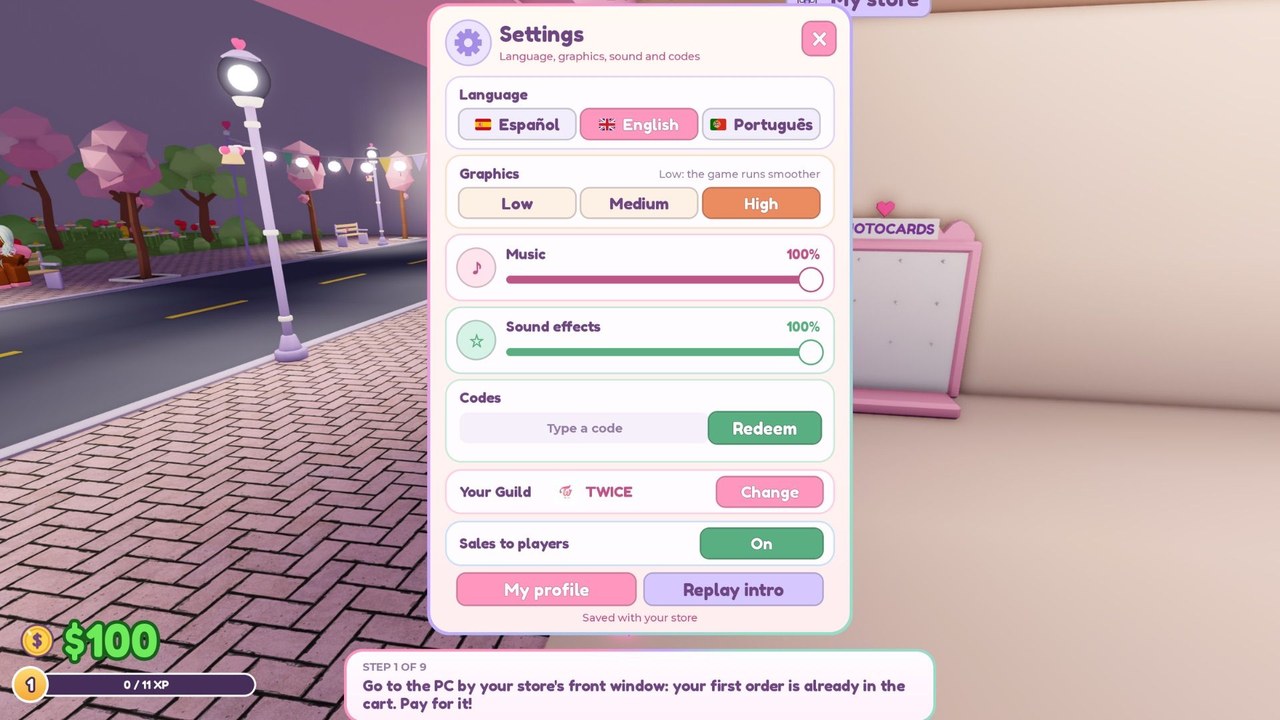
Promo codes are the fastest free injection of cash and money multipliers in My KPOP Shop, the Roblox shop tycoon by Chuuves. Redeem them early, stack the temporary 2x Money windows with busy restock and checkout periods, and you will fund shelves, staff, and photocard packs much sooner than grinding sales alone. This hub lists every working code we have verified, explains exactly how to redeem in Settings, covers why codes fail, and shows where new drops usually appear first.
If you just joined, skim the Getting Started guide first so you know where Settings lives and how the shop loop works, then come back here to claim rewards before you expand.
Working My KPOP Shop codes (November 2026)
List re-verified on November 22, 2026 against the live Roblox description and major code roundups. Pocket-Codes and the experience page still advertise KPOPSHOP; GameRant sometimes omits it while listing the two 2x Money codes—redeem all three in Settings until one fails in-game.
Enter each code exactly as written. Most rewards are once per Roblox account.
| Code | Reward |
|---|---|
| KPOPSHOP | $150 cash |
| 250LIKES | 2x Money for 30 minutes |
| MONEYPLEASE | 2x Money for 30 minutes |
Expired codes: none listed yet. When a code stops redeeming, we move it here and refresh this table after we re-check in-game.
Next codes teased: developers have pointed at milestones around 2500 likes and 5000 favorites on the Roblox experience page. Hitting those community goals is the most reliable path to the next free drop, so like and favorite the game if you have not already.
How to redeem codes
- Launch My KPOP Shop on Roblox and join a server.
- Open the Settings menu from the in-game UI.
- Find the code / redeem text box.
- Paste the code exactly (copy from the table above to avoid typos).
- Confirm to claim cash or start the 2x Money timer.
Do this as soon as you load in. Cash from KPOPSHOP can go straight into early stock or your first hire. The two 2x Money codes each run for thirty minutes, so redeem them when you are ready to play actively—not while AFK.
Why a code might fail
- Typo or extra space — paste instead of typing; trailing spaces break many redeem boxes.
- Wrong capitalization — codes are case-sensitive; use the exact spelling from this list.
- Already redeemed — most promo codes are single-use per account.
- Expired or rotated — Chuuves can disable a code without a long warning; re-check this page and Discord if a formerly working code rejects.
- Wrong place — codes go in Settings, not chat. Typing a code in public chat will not grant the reward.
If every current code fails and Discord has not announced a wipe, wait for a short patch window and try again; temporary redeem bugs happen on new experiences.
How to find more codes
- Official Discord — join discord.com/invite/DXgBEaQ5RZ. New codes and milestone teases usually land there first.
- Roblox like / favorite milestones — watch for announcements tied to 2500 likes, 5000 favorites, and later goals the team posts.
- Updates hub — we summarize code drops and patch notes so you do not miss a November-style wave of rewards.
- This Codes Hub — we refresh the working table when a code is confirmed in-game.
Bookmark the Discord and this page. Codes on a young game can appear quickly after community milestones and disappear just as fast once the campaign ends.
Tips: use 2x Money during busy windows
A thirty-minute double-money buff is wasted if shelves are empty, the checkout line is idle, or you are stuck chasing thieves alone. Before you redeem 250LIKES or MONEYPLEASE:
- Restock high-demand merch so fans keep buying through the whole timer.
- Hire or station a restocker and cashier if you can afford them, so sales keep flowing while you catch thieves or decorate.
- Invite friends for the +10% earnings per friend on the server bonus; stacking friend bonus on top of 2x Money is one of the best early cash spikes in the game.
- Avoid redeeming both 2x codes back-to-back if you only have twenty minutes to play—save the second for another session unless you can actively run the shop for a full hour.
- Pair the buff with goals from the make money guide: clear queues, keep shelves full, and push sales rankings while every purchase pays double.
Cash from KPOPSHOP is flexible. New players should prioritize filling shelves and unlocking basic staff before heavy décor. Mid-game players can dump the $150 into photocard packs or a missing guard if theft is already cutting into profits.
Codes and your first hour
Redeem KPOPSHOP immediately after tutorial prompts settle. Spend the cash on stock gaps first, then consider your first hire. Save at least one 2x Money code for a focused session where you can restock, serve, and catch thieves without leaving the shop idle. That pattern turns free codes into permanent shop upgrades instead of a short coin spike you barely notice.
For broader progression after codes, continue with Getting Started, the make money guide, and the Updates hub for the next milestone teases. Codes accelerate the loop; they do not replace good stocking and staff priorities.
Stay skeptical of random code lists that invent rewards or demand off-site logins. Only redeem inside My KPOP Shop Settings, and treat Discord plus this wiki as your primary verification path.
Frequently Asked Questions
Quick answers for My KPOP Shop players.
Where do I redeem My KPOP Shop codes?
Launch the game, open the Settings menu, paste the code into the redeem box, and confirm. Codes do not work in chat.
What are the working codes right now?
KPOPSHOP gives $150 cash. 250LIKES and MONEYPLEASE each give 2x Money for 30 minutes. No expired codes are listed yet.
When will the next code drop?
Developers have teased rewards around 2500 likes and 5000 favorites. Watch the official Discord and this Codes Hub for confirmations.
Should I redeem both 2x Money codes at once?
Only if you can actively run a stocked shop for about an hour. Otherwise save the second boost for another focused session.
Why did my code say invalid?
Check spelling and capitalization, remove spaces, confirm you have not already redeemed it, and make sure you used Settings—not chat.